Do you need any help or guidance with the “run” app? We may have a solution for you, or we’ll be glad to hear from you.
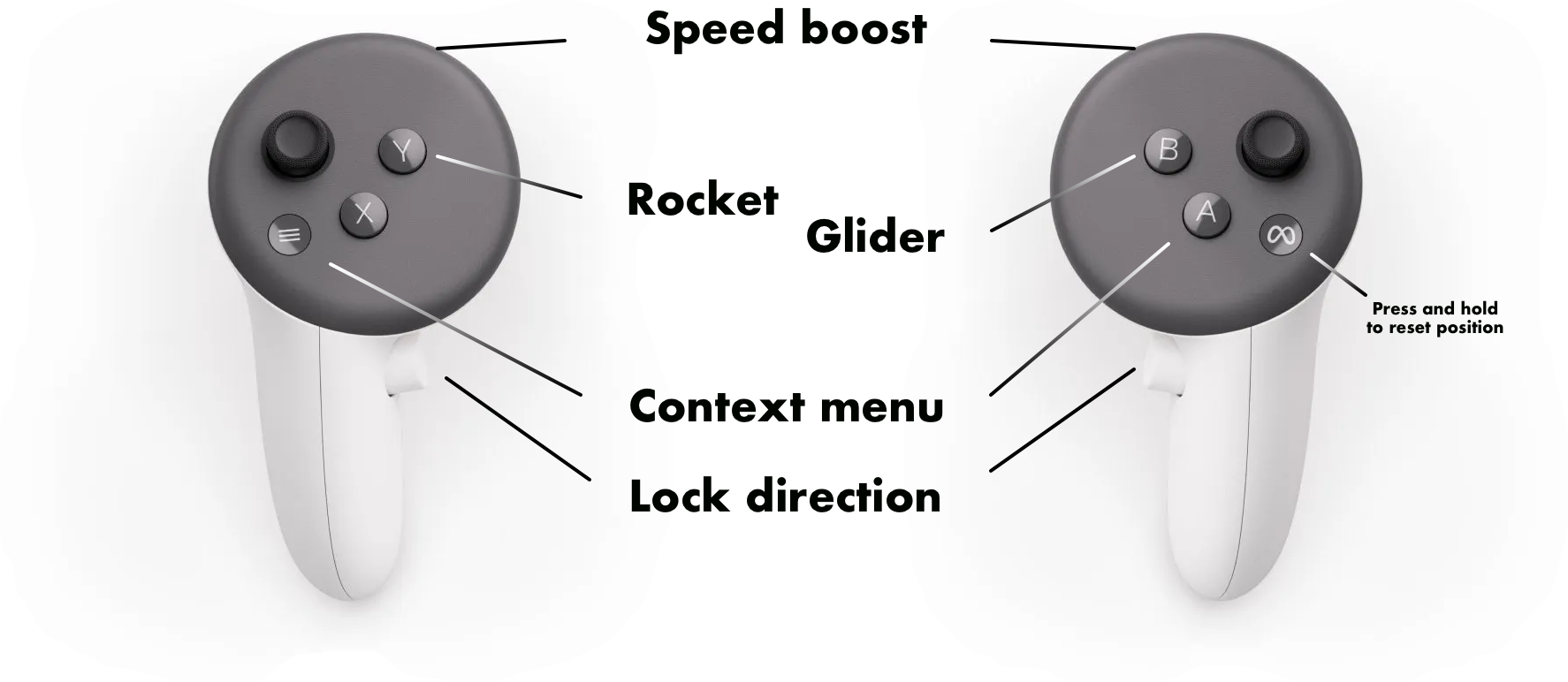
Sometimes you need to reset the position of the head gear. Press and hold the "O" button on your hand controller to reset your position in the virtual world.
To avoid dizziness while playing the VR app, you may want to avoid using the boost feature. You can also adjust the bouncing to make it more realistic and match your running motion.
Maybe it is behind you. Just turn around, or use the joystick to turn.
We won’t spoil the fun by telling you where they are. Finding the diamonds is part of the challenge. But you might find some hints on youtube.
To change the volume, press the volume buttons on the meta quest head set.
You can use the app without controllers. Just use your hands to select levels, and use finger pinches to activate functions like boosting, gliding and direction lock.
A - Context menu
B - Glider
Y - Jet pack
X - Stand still
Shoot - Boost speed
Grip - Lock direction